✕
Pricing
New progeCAD 2027 is here — Industry-standard DWG support & improved BIM tools See what's new
Products → progeMOVE
Utility

progeMOVE

Upgrading to progeCAD 2027? Keep everything you set up. progeMOVE finds your older progeCAD on this PC and moves your settings, menus, command aliases, workspaces, tool palettes, startup programs and your own files to progeCAD 2027 — or gives you a free PDF with the exact steps to do it yourself.

$99 per computer · one-time
  • From progeCAD 2022, 2024, 2025 or 2026 Professional to progeCAD 2027 Professional
  • Several versions on your PC? You choose which one to bring forward
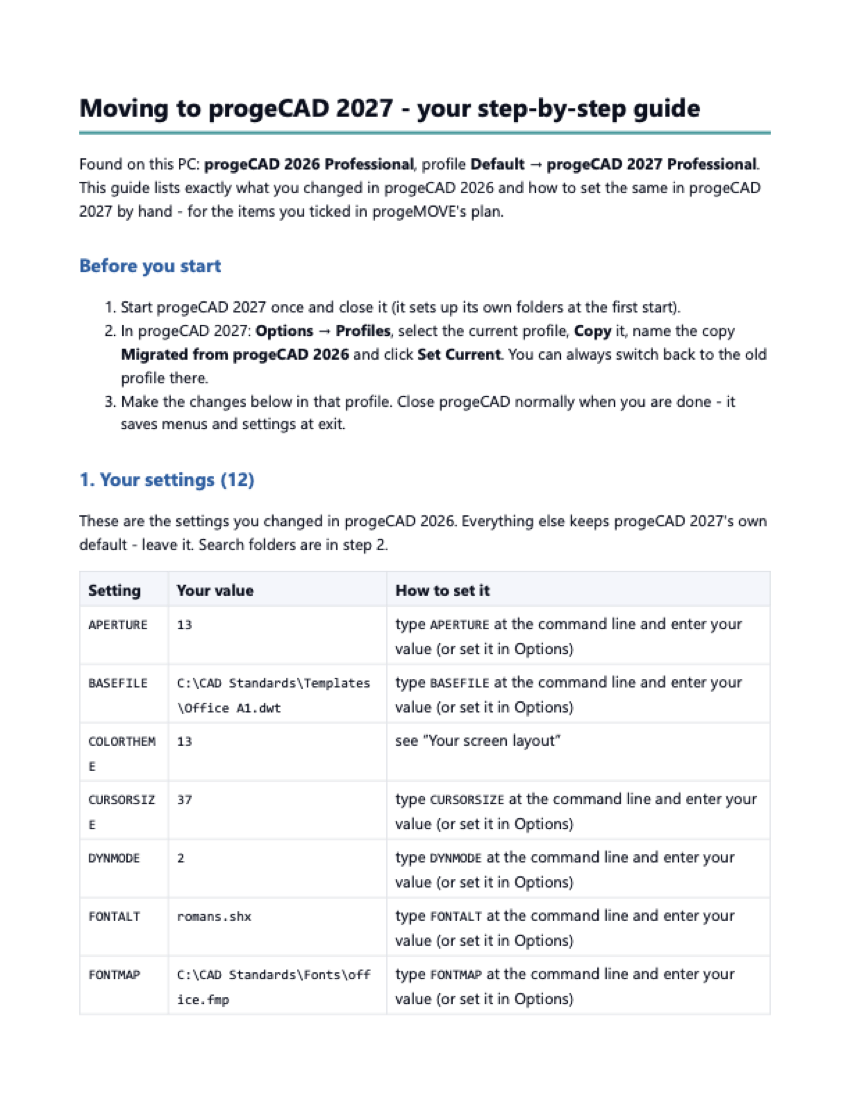
  • Free: a PDF with the exact steps for what you changed
  • For $99: progeMOVE does it for you in about a minute
  • Your old progeCAD is never changed, and one-click Undo puts everything back
  • Windows 10 or 11, no administrator rights needed
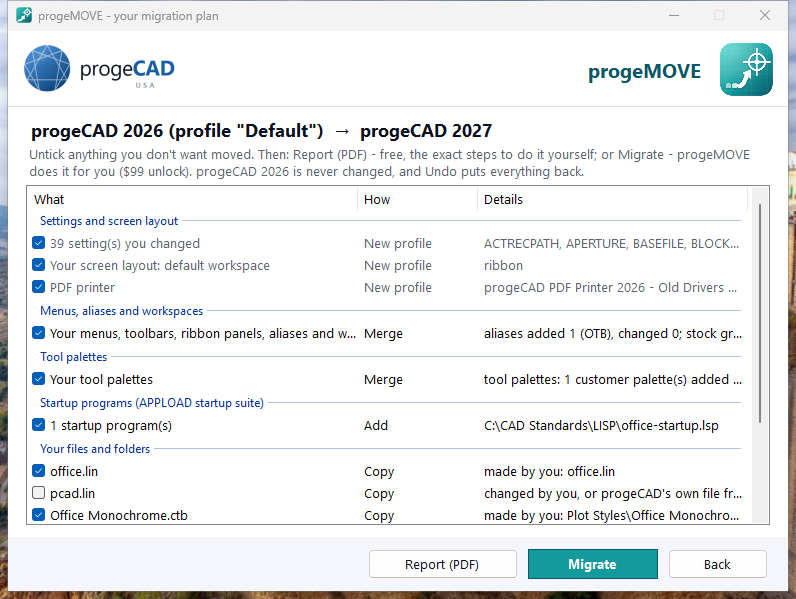
progeMOVE plan screen: everything found in progeCAD 2026, with tick boxes, Report (PDF) and Migrate

Everything progeMOVE found, with tick boxes: then a free PDF report, or Migrate.
What it moves

Your progeCAD, the way you set it up.

Settings

Every option and system variable you changed, your search folders and support paths, the save format and your PDF printer. progeCAD 2027's own new defaults stay for everything you never touched.

Screen layout

Your workspace, ribbon or menu bar and colour theme, so progeCAD 2027 opens the way you are used to — without the first-start questions.

Menus and aliases

Your own menus, toolbars, ribbon panels, commands, command aliases and workspaces, merged into progeCAD 2027's new menus — including changes you made inside progeCAD's own menus.

Tool palettes

Your own palettes and tools, including block tools that insert from your own folders.

Startup programs

The LISP and other programs in your APPLOAD Startup Suite load again in progeCAD 2027.

Your files

Linetypes, hatch patterns, plot styles and other files you made or changed are copied; your own folders (blocks, templates, LISP) stay where they are and progeCAD 2027 is pointed to them.

How it works

Four steps.

  1. Install progeCAD 2027 and start it once (it sets up its folders), then close it.
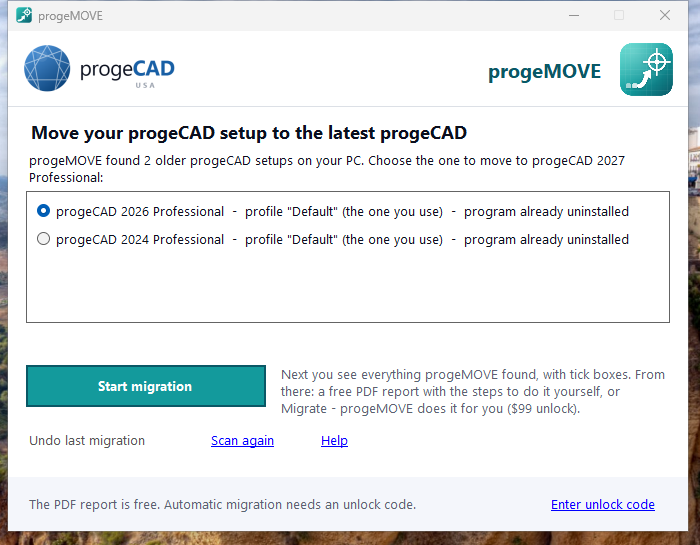
  2. Open progeMOVE. It lists every older progeCAD it found. Pick the one to bring forward and click Start migration.
  3. Check the list. Untick anything you don't want. Report (PDF) gives you the exact steps to do it by hand — free.
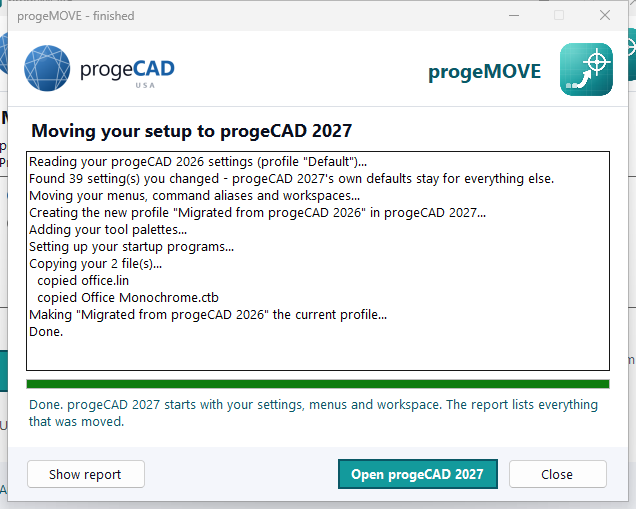
  4. Or click Migrate. With an unlock code, progeMOVE does it all in about a minute, then opens progeCAD 2027 with your setup.
progeMOVE start screen listing the progeCAD versions found

Choose the version to bring forward

First page of the free progeMOVE PDF report with the manual steps

The free PDF report

progeMOVE finished migrating to progeCAD 2027

Migrated in about a minute

Why progeMOVE

Safe for the setup you rely on.

Your old progeCAD stays as it isprogeMOVE only reads it. You can keep using it side by side.
A new profile, nothing overwrittenYour setup arrives as a new progeCAD 2027 profile, “Migrated from progeCAD 2026”. Your other profiles are not touched, and you can switch back in Options → Profiles at any time.
One-click UndoEverything progeMOVE changed is backed up first. Undo last migration puts it all back.
Only what you changedSettings you never touched keep progeCAD 2027's own defaults, so you get the new version's improvements.
Careful with filesOnly files you made or changed are copied. Your own folders stay where they are, and progeCAD's own files are never copied over the new version's.
RequirementsWindows 10 or 11 (64-bit); progeCAD 2027 Professional installed and started once; your older progeCAD 2022, 2024, 2025 or 2026 Professional (English) on the same PC and Windows user. No administrator rights needed. Internet once to unlock.
LicenceThe report is free. One unlock code per computer, $99 one-time; on that computer you can run Migrate and Undo as often as you like.

Full details: progeMOVE help.

FAQ

Questions about progeMOVE

From progeCAD 2022, 2024, 2025 or 2026 Professional to progeCAD 2027 Professional (there was no 2023 release). progeCAD Smart, versions before 2022 and non-English installs are not supported yet.
The one you choose. progeMOVE lists every version and profile it finds, newest first. Each run moves one; run it again for another and you get a second migrated profile next to the first.
A PDF with the exact steps for the items you ticked: each setting you changed and how to set it, the folders to add, how to bring your menus, aliases, palettes and startup programs across, and which files to copy where.
Add-ons from other makers (install their progeCAD 2027 versions) and printer names saved inside your drawings' page setups. Your LISP programs are not changed — progeMOVE moves how they are loaded. Anything it could not carry is listed in its report with how to do it by hand.
Open progeMOVE and click Undo last migration (with progeCAD closed): everything goes back to how it was. Or simply switch back to your previous profile in progeCAD's Options → Profiles. Questions: [email protected].
Only here on progecad.us: buy a progeMOVE unlock code. Your progeCAD reseller can give you the free progeMOVE download.

Bring your progeCAD setup with you.

Download progeMOVE free and get your step-by-step report. When you want progeMOVE to do the work: $99 per computer, one-time.