progeCAD utility by progeCAD USA
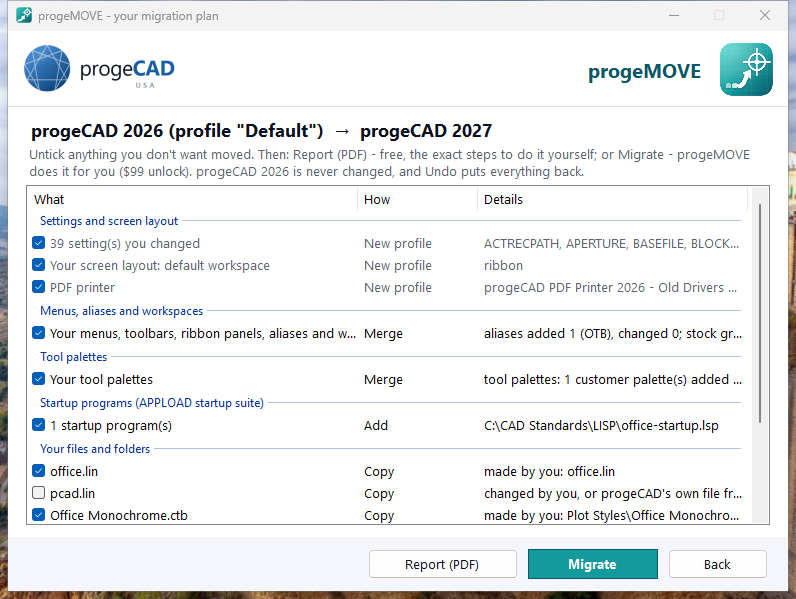
progeMOVE moves your settings, menus, command aliases, workspaces, tool palettes, startup programs and your own files from progeCAD 2022, 2024, 2025 or 2026 Professional to progeCAD 2027 — in about a minute, with one-click Undo.
What the unlock code adds
Everything you ticked is moved in one go, in about a minute, instead of an afternoon of dialogs.
Your own menus, toolbars, ribbon panels and aliases are merged into progeCAD 2027's new menus, so you keep both.
Settings you never touched keep progeCAD 2027's new defaults. Path lists get your folders added.
progeCAD 2027 opens in your workspace with your theme — no first-start questions.
A new profile, “Migrated from progeCAD 2026”; your old progeCAD and your other profiles stay as they are.
Everything is backed up first. Undo puts it all back — run Migrate and Undo as often as you like.
Unlock progeMOVE
The progeMOVE download and its PDF report are free. One unlock code lets progeMOVE migrate for you on one computer — buy one for each computer you upgrade.
Your unlock code arrives by email right after checkout. Then open progeMOVE, click Start migration, then Migrate, and enter the code (an internet connection is needed once). Requires progeCAD 2027 Professional and your older progeCAD 2022–2026 Professional on the same PC. Need the installer? Download progeMOVE · Help