Drawing gear teeth by hand is slow, and getting the involute curve right is fiddly. Our free Part Generator does it for you. Enter a few numbers, check the preview and download a DXF you can open in progeCAD or any CAD program.
Five parts
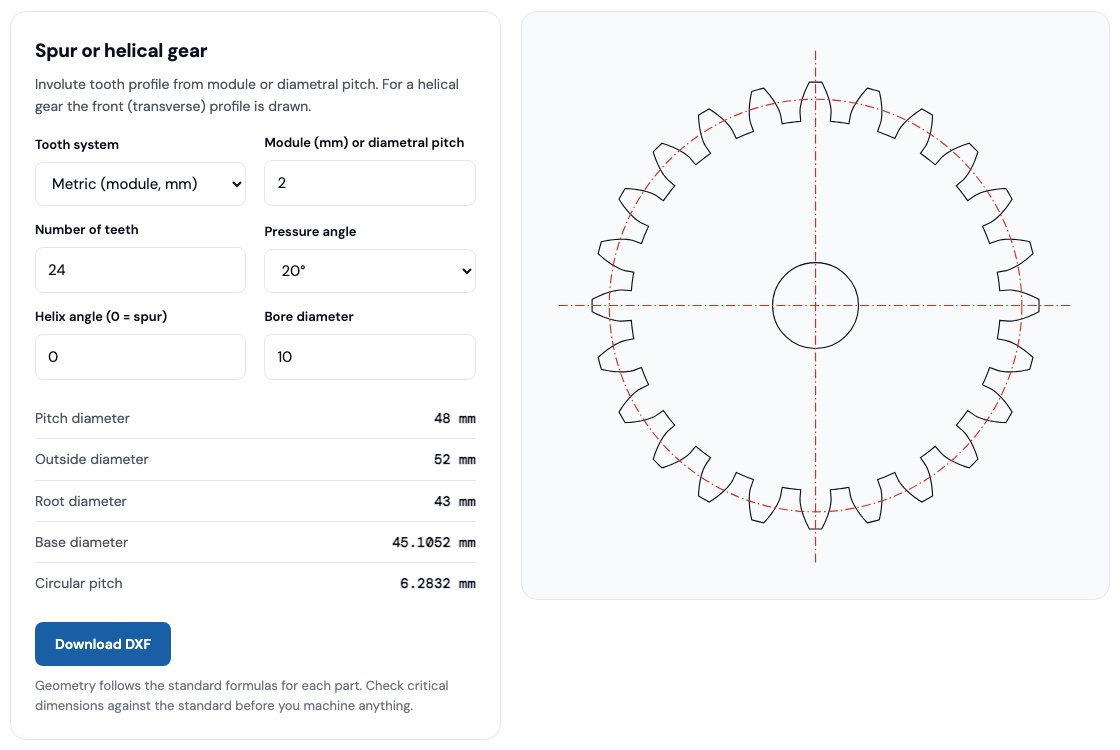
- Spur or helical gear. Involute teeth from a metric module or an inch diametral pitch. Choose 14.5°, 20° or 25° pressure angle, the number of teeth, a helix angle (0 for spur) and the bore. You get the pitch, outside, root and base diameters and the circular pitch. For a helical gear it draws the front (transverse) profile. It warns you when a gear has so few teeth that real gears would be undercut.
- Roller chain sprocket. ANSI chain sizes #25 to #160, any number of teeth and a bore.
- Keyed bore (hub keyway). A bore with a keyway sized from ANSI B17.1 (inch, square keys) or DIN 6885 (metric). Type a key width to override the standard size.
- Flange or bolt pattern. Pick an ASME B16.5 Class 150 size, or enter your own outside diameter, bolt circle, number of holes, hole size and starting angle. You get the hole spacing in degrees and the chord between holes.
- Sheet border and title block. ANSI A–E or ISO A4–A0, at full size, with your company, drawing title, number, revision, drawn by, date and scale filled in. Put it in a layout or insert it as a block.
How it works
The DXF is made in your browser. Nothing is sent to a server. The file is a DXF R12, the most widely readable version, so it opens in progeCAD, AutoCAD, CAM software and laser or plasma cutter programs. The geometry goes on separate layers for outlines, center lines and holes, so you can change line types and colors in one step.
Example: a metric gear with module 2 and 24 teeth gives a 48 mm pitch diameter, 52 mm outside diameter and 43 mm root diameter.
Check before you cut. The geometry follows the standard formulas for each part, but check critical dimensions against the standard before you machine anything.
Finish the drawing in progeCAD
Open the DXF in progeCAD, add dimensions and tolerances, and save it as DWG. progeCAD costs $540 one time, with a perpetual license and no subscription. It includes the tools mechanical designers use every day. See progeCAD for mechanical design.
The Part Generator is one of five free CAD tools on our site, along with scale calculators, a DWG version checker, block libraries and reference downloads.
Enter a few numbers, download the DXF and open it in progeCAD 2027, free for 30 days.
Like progeCAD USA on Facebook for more CAD tips, tutorials and news.